|
|
htpc的media player软件也能bit stream audio了??
 [复制链接]
|
|
|
 发表于 12-11-2010 11:08 PM
|
显示全部楼层
发表于 12-11-2010 11:08 PM
|
显示全部楼层
|
|
|
|
|
|
|
|
|
|
|
发表于 12-11-2010 11:09 PM
|
显示全部楼层
那末支援DTS-HD或Dolby TrueHD的是什么格式呢? BD.ISO? M2TS?
杀贴者 发表于 12-11-2010 10:48 PM 
对... 这是我下载到的FORMAT.. |
|
|
|
|
|
|
|
|
|
|
|

楼主 |
发表于 15-11-2010 11:22 AM
|
显示全部楼层
你的经历也是我以前经历过的
所以为了省麻烦, 我直接下载BD的版本(40-50GB)
然后很感激这里的 ...
little_orc 发表于 12-11-2010 11:08 PM 
嘿嘿..其实也没什么..只是想搞清楚..和做最佳的设定… 假如mkv可以support DTS-HD MA / Dolby True HD的话..播放软件又能passthru..那当然想把它给设定好.. 不能的话也无所谓…DTS对我来说也够了… 平时下十多GB的MKV已经要吐血了 …BD-iso那种4-50GB的想都不敢想..呵呵.. …BD-iso那种4-50GB的想都不敢想..呵呵.. |
|
|
|
|
|
|
|
|
|
|
|
楼主 |
发表于 15-11-2010 11:24 AM
|
显示全部楼层
|
有下BD-iso之类的朋友不妨试下..
Guide: Setting Up Bitstreaming With Your Windows 7 HTPC – PART I
My Setup:- Windows 7 x32 HTPC w/ Sapphire 5670 GPU connected to Receiver via HDMI
- Onkyo TX-SR906 AVR, 5.1 speaker setup connected to TV via HDMI
- Panasonic Viera TH-58PZ800U Plasma HDTV
Hardware Requirements:- PC running Windows (preferably Windows 7) with either an AMD 5xxx GPU, Intel i3/i5 Clarkdale CPU, or HD Bitstream capable Sound Card
- A Receiver that can decode the DTS(MA) and TrueHD
—————SETTING UP WITH MPC HC—————
Files to Download:
Setup:
1. Install AMD Video Card Driver (only applies to 5xxx GPU). Restart PC
2. Install Realtek ATI HDMI Audio Driver (only applies to 5xxx GPU) or Intel Driver. Restart PC
3. Set up HDMI Audio (showing setup using 5xxx GPU)- In toolbar right click on speaker icon and go to “Playback Devices”. The Realtek HDMI Output should be set as default under the Playback Tab. Highlight this, and click the “Configure” button.
 - Walk through the speaker setup, which is pretty self explanatory.
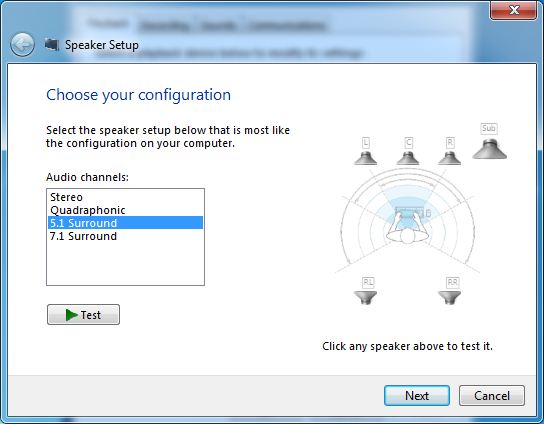 - After the Speaker Setup is complete you should be back at the Playback Tab. Select RealTek HDMI Output and click the “Properties” button. Under the Supported Formats tab, you should see all supported formats, including DTS-HD and TrueHD.
 |
|
|
|
|
|
|
|
|
|
|
|
楼主 |
发表于 15-11-2010 11:24 AM
|
显示全部楼层
4. UPDATE – IT APPEARS THAT WITH THE LATEST ATI CCC RELEASE (10.4) THE EDID ISSUE HAS BEEN FIXED, SO THIS STEP SHOULD NO LONGER BE NEEDED!!! Download and install EDID override (only applies to 5xxx GPU). There appears to be an issue with the ATI drivers not parsing correctly the EDID of certain receivers. Hopefully this will be fixed in an upcoming driver release, but until then you can override the current driver to correct. To make it even more confusing, it appears to only affect Denon, Onkyo, and Sony (but even then not all models). Best idea would be to skip this step completely, set everything up, and if bitstreaming is not working install the EDID override per Tulli’s instructions.- Download necessary EDID and extract somewhere on your PC
- Right click on desktop and select “Personalize”
- Click on Display -> Change Display Settings
- Click on Screen of AVR display -> click “Advanced Settings”
- Select Monitor Tab -> “Properties”
- Select Driver Tab -> “Update Driver”
- Select “Browse my computer for updates” -> “Let me pick from a list of drivers my computer” -> “Have Disk” -> “Browse” -> navigate to display device .inf file -> Click Open -> OK -> Install new driver
- Reboot
5. Install FFDShow. Launch ffdshow audio decoder configuration, go into Output, and tick off all the audio options under the “Pass-through (S/PDIF, HMDI)” settings.
EDIT – IF YOU GET AN “ACM WRAPPER” ERROR WHEN PLAYING MOVIES WITH LPCM TRACKS, GO INTO THE CODECS SECTION OF FFDSHOW AUDIO, SCROLL TO THE BOTTOM, AND FOR UNCOMPRESSED CHANGE FROM DISABLED TO ALL SUPPORTED. BIG THANKS TO DSUDOT FOR HELPING ME TROUBLESHOOT.

6. Install DirectX End-User Runtime if necessary.
7. Install MPC HC. Open MPC HC, go to View -> Options- Under “Output” keep default settings. Make sure Audio Renderer is set to “System Default”


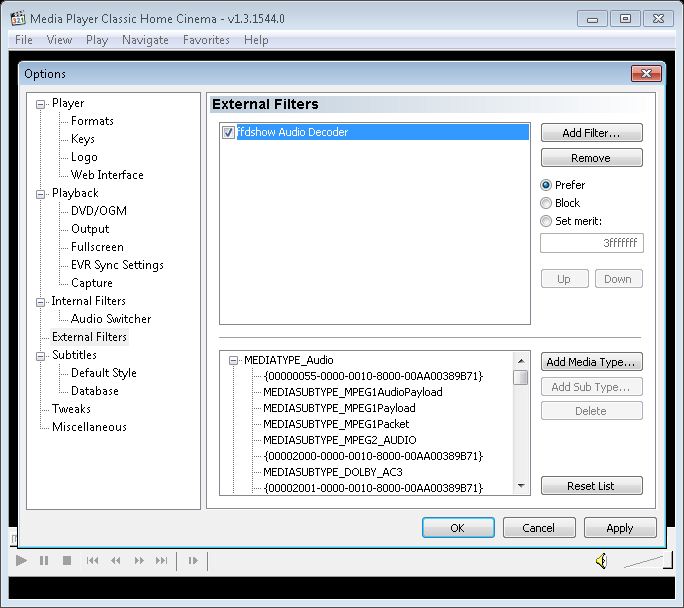

|
|
|
|
|
|
|
|
|
|
|
|
楼主 |
发表于 15-11-2010 11:25 AM
|
显示全部楼层
|
8. Now it is the moment of truth. Navigate to one of more movies that has a DTS(MA) or TrueHD audio track and play it with MPC HC. If all went well you should see the the DTS(MA) or TrueHD logo light up on your Receiver. You can also verify by placing your cursor over the ffdshow icon in your toolbar (pictures below in the bottom right hand corner) 
The beauty of using MPC HC as your player is that many Media Center platforms supports the use of a 3rd party player such as MPC. For instance, check out this guideon how to set up MPC as your 3rd party player in WMC + Media Browser. If you have any problems I would definitely recommend visiting one of the resources mentioned below, as there is a wealth of information and very helpful members. |
|
|
|
|
|
|
|
|
|
|
|
发表于 15-11-2010 11:51 AM
|
显示全部楼层
|
|
|
|
|
|
|
|
|
|
|
楼主 |
发表于 15-11-2010 11:55 AM
|
显示全部楼层
哈哈... 谢谢你的资料...
如果你是来自JB的话, 我有大概3部40-50GB的MOVIE, 我可以免费抄给你试试...
...
little_orc 发表于 15-11-2010 11:51 AM
不客气...希望对你们有帮助...
好的..看几时有下JB再找你..呵呵.. |
|
|
|
|
|
|
|
|
|
|
|
发表于 15-11-2010 11:58 AM
|
显示全部楼层
|
|
|
|
|
|
|
|
|
|
|
楼主 |
发表于 15-11-2010 12:03 PM
|
显示全部楼层
因为我的untouched bluray是肉酱档, 所以只适合用POWERDVD来看... 说真的, 画面和声音比MKV好的很多... ...
little_orc 发表于 15-11-2010 11:58 AM
之前朋友抄了一部BDMV的Rambo给我..size很大下..
请问是不是类似BD-iso来的??
我用pure codec开不到... |
|
|
|
|
|
|
|
|
|
|
|
发表于 15-11-2010 12:08 PM
|
显示全部楼层
本帖最后由 little_orc 于 26-11-2010 10:04 AM 编辑
之前朋友抄了一部BDMV的Rambo给我..size很大下..
请问是不是类似BD-iso来的??
我用pure codec开不到...
车痴 发表于 15-11-2010 12:03 PM
你是不是有这样的FOLDER?? |
|
|
|
|
|
|
|
|
|
|
|
楼主 |
发表于 15-11-2010 12:12 PM
|
显示全部楼层
你是不是有这样的FOLDER??
little_orc 发表于 15-11-2010 12:08 PM
对..类似这样的..里面有playlist和几个sub folder..
要用power DVD来开? |
|
|
|
|
|
|
|
|
|
|
|
发表于 15-11-2010 02:15 PM
|
显示全部楼层
对..类似这样的..里面有playlist和几个sub folder..
要用power DVD来开?
车痴 发表于 15-11-2010 12:12 PM
对, 直接用POWER DVD来开就好了...画面清楚, 又可以输出MA-HD... 一举两得... |
|
|
|
|
|
|
|
|
|
|
|
楼主 |
发表于 15-11-2010 02:18 PM
|
显示全部楼层
对, 直接用POWER DVD来开就好了...画面清楚, 又可以输出MA-HD... 一举两得...
little_orc 发表于 15-11-2010 02:15 PM
回去再试看看...那天用VLC player来播..没有DTS-HD MA |
|
|
|
|
|
|
|
|
|
|
|
发表于 15-11-2010 02:56 PM
|
显示全部楼层
回去再试看看...那天用VLC player来播..没有DTS-HD MA
车痴 发表于 15-11-2010 02:18 PM
试了记得放上RESULTS |
|
|
|
|
|
|
|
|
|
|
|
楼主 |
发表于 15-11-2010 03:00 PM
|
显示全部楼层
试了记得放上RESULTS
little_orc 发表于 15-11-2010 02:56 PM
一定....成功的话我会放上来的... |
|
|
|
|
|
|
|
|
|
|
|
发表于 15-11-2010 06:20 PM
|
显示全部楼层
原来你是用MKV的FORMAT, 根据我所知道的是, MKV最高只能SUPPORT DTS, TRUE HD或MASTER AUDIO应该都SUPP ...
little_orc 发表于 12-11-2010 11:56 AM 
mkv其实只是把视频/音频/字幕封装为一个文件的格式,在一些网站有看到有些网友已经成功把TRUE HD或MASTER AUDIO纳入mkv了,不过这些音频每部最少2~3G以上所以很少人玩! |
|
|
|
|
|
|
|
|
|
|
|
发表于 15-11-2010 06:24 PM
|
显示全部楼层
那末支援DTS-HD或Dolby TrueHD的是什么格式呢? BD.ISO? M2TS?
杀贴者 发表于 12-11-2010 10:48 PM
现在比较流行支援DTS-HD或Dolby TrueHD的格式有ts,avi,mpeg2,bdmv等 |
|
|
|
|
|
|
|
|
|
|
|
发表于 15-11-2010 06:49 PM
|
显示全部楼层
|
|
|
|
|
|
|
|
|
|
|
发表于 15-11-2010 09:58 PM
|
显示全部楼层
mkv其实只是把视频/音频/字幕封装为一个文件的格式,在一些网站有看到有些网友已经成功把TRUE HD或 ...
kylee 发表于 15-11-2010 06:20 PM
原来....谢谢你的资料... 不过我2-3GB还好过BLURAY多多... BLURAY最少都要10-20GB吧??? |
|
|
|
|
|
|
|
|
|
| |
本周最热论坛帖子
|










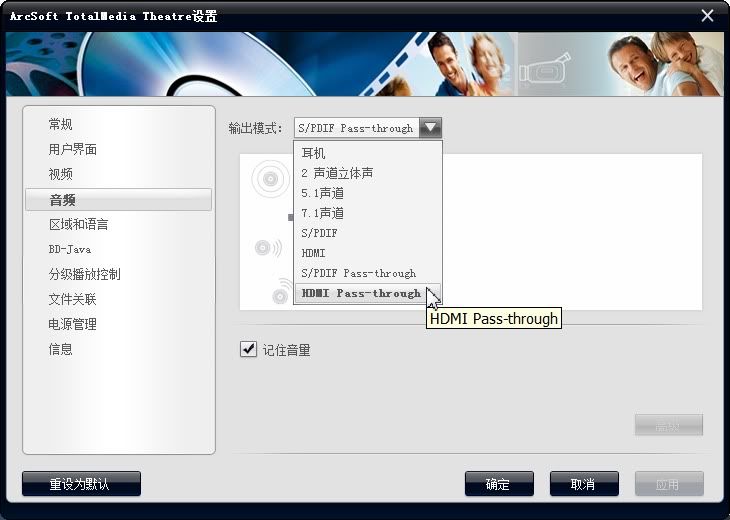
 记得是选打开光碟文件来看。
 1060
1060  119
119


