|
|
【Galaxy Note2 GT-N7100】开箱文/16 GB/超耐电池/拍照-迎来Kitkat 4.4 继续复活
 [复制链接]
|
|
|

楼主 |
发表于 15-11-2012 12:03 PM
|
显示全部楼层
小妹xiaomeii 发表于 15-11-2012 11:18 AM 
我的小诺变粉红色啦!!!
我的case竟然脱色!!!染到我的壳变粉红了!!!
买的时候拼 ...
严重吗?拍照来看看怎么脱色?
给大家知道什么样的Casing,下次大家会小心。
|
|
|
|
|
|
|
|
|
|
|
|
 发表于 15-11-2012 12:04 PM
|
显示全部楼层
发表于 15-11-2012 12:04 PM
|
显示全部楼层
傻鸭 发表于 14-11-2012 01:43 PM
本来就没送
 那就好 那就好
我只是怕被坑 罢了
|
|
|
|
|
|
|
|
|
|
|
|
楼主 |
发表于 15-11-2012 12:04 PM
|
显示全部楼层
小妹xiaomeii 发表于 15-11-2012 11:59 AM
拍不清,其实很明显!!!
变成粉红色的Color了。另一番风味。.gif)
|
|
|
|
|
|
|
|
|
|
|
|
发表于 15-11-2012 12:10 PM
|
显示全部楼层
别安慰了.gif) |
|
|
|
|
|
|
|
|
|
|
|
发表于 15-11-2012 12:19 PM
|
显示全部楼层
傻鸭 发表于 14-11-2012 08:10 PM
做莫没有N7105的rom的
@martinX 帮一下忙,我在XDA找不到
|
|
|
|
|
|
|
|
|
|
|
|
发表于 15-11-2012 12:19 PM
|
显示全部楼层
小妹xiaomeii 发表于 15-11-2012 11:59 AM
拍不清,其实很明显!!!
如果染色很balance,其實也不錯,暫時全世界就你一架粉紅色。
|
|
|
|
|
|
|
|
|
|
|
|
发表于 15-11-2012 12:19 PM
|
显示全部楼层
ethanyap 发表于 15-11-2012 11:52 AM
还没,在上班。。 - -!!!
我是Digi的。。。
不知道这样转过去,不知道需要advance payment还是什么的。 ...
那麼你需要付advance payment了
如果你sign 1年就500,2年就1000
然後在5個月內,把這些錢average還你
maxis center 星期六有開 |
|
|
|
|
|
|
|
|
|
|
|
发表于 15-11-2012 12:26 PM
|
显示全部楼层
只是要看一下你们的看法
我昨晚charge 到100% 临睡前看了5集 20分钟的戏
然后今天早上还剩70%,你们觉得耐还是普通?
我睡觉没动它从80%跌到70%,会跌很多吗? |
|
|
|
|
|
|
|
|
|
|
|
发表于 15-11-2012 12:26 PM
|
显示全部楼层
Sanctuary 发表于 15-11-2012 12:19 PM
如果染色很balance,其實也不錯,暫時全世界就你一架粉紅色。
也是的。。。
|
评分
-
查看全部评分
|
|
|
|
|
|
|
|
|
|
|
发表于 15-11-2012 12:32 PM
|
显示全部楼层
傻鸭 发表于 15-11-2012 12:26 PM
只是要看一下你们的看法
我昨晚charge 到100% 临睡前看了5集 20分钟的戏
然后今天早上还剩70%,你们觉得耐 ...
我觉得,正常哦
我的也会在睡觉时掉10%左右
我觉得在50%以下后电比较耐一些 |
|
|
|
|
|
|
|
|
|
|
|
楼主 |
发表于 15-11-2012 12:34 PM
|
显示全部楼层
傻鸭 发表于 15-11-2012 12:19 PM
@martinX 帮一下忙,我在XDA找不到
帮你找到了一个Official Rom XXALIJ ,992MB。 适用 N7105的。刷机的方法是一样的,请参考下列的刷法。
http://www.hotfile.com/dl/176688 ... LBALIB_MM1.zip.html
资料来源:http://www.ibtimes.co.uk/article ... ellybean-xxalij.htm
Galaxy Note 2 N7105 Gets Official Jelly Bean Update with XXALIJ ROM [How to Install]
Close on the heels of other Galaxy Note 2 variant - N7100, the N7105 joins the Jelly Bean party with the release of the latest Android 4.1.1 XXALIJ ROM. As this ROM is an official release, the latest Jelly Bean update for the tablet is also available through Samsung KIES. Users who missed the update over KIES software can now manually download it using this guide.
Key Points to Note
- The XXALIJ ROM and the instructions given in this guide are applicable only to the Galaxy Note 2 N7105 model only and will not work on any other device. Verify your device model number by navigating to Settings > About Phone.
- IBTimes UK advises users to back up apps, important personal data and settings to avoid data loss while installing the Android 4.1.1 Jelly Bean update on your phone.
- The XXALIJ based Android 4.1.1 firmware update supports the following regions: Austria, Belgium, France, Germany, Hungary, Italy, Spain and the United Kingdom.
- The instructions provided in this guide are meant for reference purpose only and do not cover any warranty claims involving device damage or issues arising out of using the XXALIJ ROM based Android 4.1.1 firmware update. Users are advised to proceed at their own risk.
- Download the latest USB drivers for your Samsung Galaxy Note 2 to enable connectivity with the computer.
- Enable USB debugging mode by navigating to Settings > Application > Development and check the USB debugging option. This feature helps connect your Android device with the computer.
- Verify that your phone battery is at least 85 percent charged to avoid unexpected device shutdown (due to battery drain) while flashing the custom ROM or installing the Jelly Bean update.
- Ensure that your phone is factory unlocked and rooted before proceeding with the ROM installation procedure.
How to Update Galaxy Note 2 N7105 to Official Android 4.1.1 Jelly Bean with XXALIJ ROM
Step 1 - Download Android 4.1.1 N7105XXALIJ ROM for Galaxy Note 2 to your computer and extract the zip file.
Step 2 - Download ODIN v1.85 which is needed to install Android 4.1.1 Jelly Bean on your Samsung Galaxy Note 2.
Step 3 - Power off your phone and boot into Download Mode. To do so, press and hold the Volume Down and Home buttons together, and then tap the Power button, until the Samsung logo or the red and yellow text appears on the screen.
Step 4 - Launch ODIN on your computer and connect your phone to it while your phone is still in Download Mode.
Step 6 - If your phone connects successfully, one of the ID OM boxes will indicate yellow with the corresponding COM port number. This step is time-consuming. So, leave it alone. OM boxes will indicate yellow with the corresponding COM port number. This step is time-consuming. So, leave it alone.
Step 7 - Choose the files you need to flash/install on your phone, which are found among the extracted files in Step 1.
- Click PDA button and choose the file named 'CODE' .
- Click Phone button and select file named 'MODEM'. Ignore this step if such a file is missing.
- Click CSC button and choose file with 'CSC' in its name. Ignore this step if such a file is missing.
- Click PIT button and choose .pit file. Ignore this step if such a file is missing.
Step 8 - In ODIN, enable Auto Reboot and F. Reset Time options. In case of Re-Partition option, check it ONLY if you chose a .pit file in the previous step.
Step 9 - Click Start button in ODIN and the ROM installation process will begin. This process may take a few minutes to complete.
Step 10 - Once the ROM is installed, your phone will reboot. When you see the home screen, disconnect your phone from the computer.
XXALIJ ROM based Android 4.1.1 Jelly Bean update is now installed on your Galaxy Note 2 N7105. Go to Settings > About phone to verify the firmware version installed.
楼主温馨提醒:
1)刷机有一定的风险的,请备份资料。最好Back Up EFS 。刷机后,全部资料会被删除。
2)刷机的时候请确保有足够电源。
3)避忌刷机的时候断电/停电/手提电脑没有电/手机没电。会导致变砖。
4)如有经验的人在旁指导更佳。
本帖最后由 martinX 于 15-11-2012 12:41 PM 编辑
|
评分
-
查看全部评分
|
|
|
|
|
|
|
|
|
|
|
发表于 15-11-2012 12:36 PM
|
显示全部楼层
傻鸭 发表于 15-11-2012 12:26 PM
只是要看一下你们的看法
我昨晚charge 到100% 临睡前看了5集 20分钟的戏
然后今天早上还剩70%,你们觉得耐 ...
你还看了5集20分钟的戏
我睡前100%, 没玩手机(1015pm to 0615am)
还剩88%
|
|
|
|
|
|
|
|
|
|
|
|
发表于 15-11-2012 12:41 PM
|
显示全部楼层
小妹xiaomeii 发表于 15-11-2012 12:26 PM
也是的。。。
这样。。。我也很想要粉红的
算了,看开点,不投诉了.gif) |
|
|
|
|
|
|
|
|
|
|
|
发表于 15-11-2012 12:49 PM
|
显示全部楼层
|
|
|
|
|
|
|
|
|
|
|
发表于 15-11-2012 01:12 PM
|
显示全部楼层
martinX 发表于 15-11-2012 12:34 PM
帮你找到了一个Official Rom XXALIJ ,992MB。 适用 N7105的。刷机的方法是一样的,请参考下列的刷法。
...
爱死你了楼主。。。变砖拿去kies restore就没事了,是吗?
|
|
|
|
|
|
|
|
|
|
|
|
发表于 15-11-2012 01:13 PM
|
显示全部楼层
小妹xiaomeii 发表于 15-11-2012 12:32 PM
我觉得,正常哦
我的也会在睡觉时掉10%左右
我觉得在50%以下后电比较耐一些
我也是这样觉得。50%以上普通跌,50%一下真难跌
|
|
|
|
|
|
|
|
|
|
|
|
发表于 15-11-2012 01:14 PM
|
显示全部楼层
kengtin 发表于 15-11-2012 12:36 PM
你还看了5集20分钟的戏
我睡前100%, 没玩手机(1015pm to 0615am)
还剩88%
我大大声的说我赢了
|
|
|
|
|
|
|
|
|
|
|
|
发表于 15-11-2012 01:15 PM
|
显示全部楼层
小妹xiaomeii 发表于 15-11-2012 11:59 AM
拍不清,其实很明显!!!
传说中的Limited版!?.gif)
|
|
|
|
|
|
|
|
|
|
|
|
发表于 15-11-2012 01:17 PM
|
显示全部楼层
rickray 发表于 15-11-2012 12:49 PM
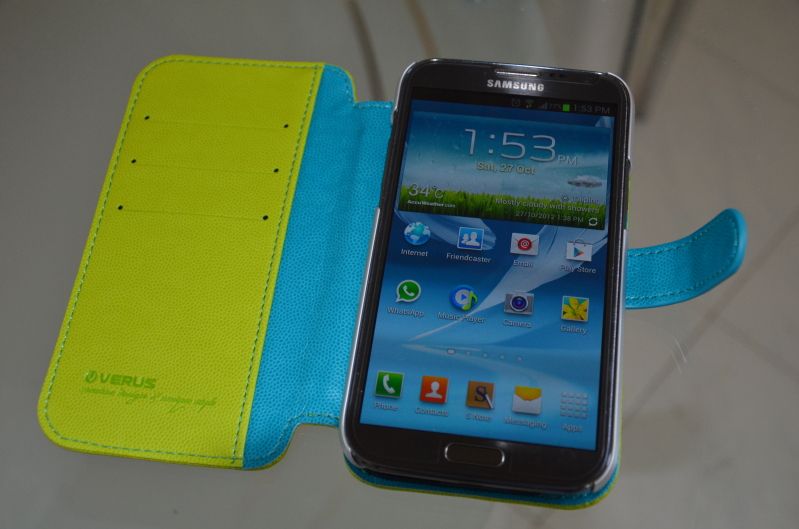
我的是这个,也是verus 2way case
好处是它可以站
应为它我磁铁所以我不喜欢,但是没想到原来可以折的,等我这个坏了,会考虑你那种,你买多少米 |
|
|
|
|
|
|
|
|
|
|
|
发表于 15-11-2012 01:19 PM
|
显示全部楼层
傻鸭 发表于 15-11-2012 01:12 PM
爱死你了楼主。。。变砖拿去kies restore就没事了,是吗?
变砖?用kies restore? |
|
|
|
|
|
|
|
|
|
| |
 本周最热论坛帖子 本周最热论坛帖子
|












 1728
1728  117
117


