|
查看: 3583|回复: 20
|
跨入三次元:C# + MDX 3D 射击游戏基本架构
[复制链接]
|
|
|
最近研究了一下 Direct 3D,终于能够成功的载入 3D 模型和控制显示,移动物件。我把这个程式分成了几个 class, 为了能够在以后的 project 里面再使用这些 class。
语言:Visual C# Express Edition 2005
API: DirectX SDK 9.0c March 2008- using System;
- using System.Drawing;
- using System.Drawing.Design;
- using System.Windows.Forms;
- using Microsoft.DirectX;
- using Microsoft.DirectX.Direct3D;
- using Microsoft.DirectX.DirectInput;
- using Microsoft.DirectX.DirectSound;
- namespace Project1
- {
- public class D3DGame : Form
- {
- Microsoft.DirectX.Direct3D.Device d3dev = null;
- Microsoft.DirectX.DirectInput.Device keyb = null;
- PresentParameters pp;
- Sprite titleSprite = null;
- Texture titleTexture = null;
- SizeF titleSize = new SizeF(800f, 600f);
- Point titlePos = new Point(0, 0);
- MyMeshClass groundMesh = null;
- PlayerClass player = null;
- enum GameStates {gsTitle, gsPlaying, gsQuiting, gsGameEnd};
- GameStates gameState = GameStates.gsTitle;
- public D3DGame()
- {
- this.Size = new Size(800, 600);
- this.Text = "Direct 3D game Framework";
- this.StartPosition = FormStartPosition.CenterScreen;
- this.FormBorderStyle = FormBorderStyle.None;
- }
- //----------------------------------------------------------------------------------------------
- static void Main()
- {
- using(D3DGame MyGame = new D3DGame())
- {
- if (!MyGame.initGame())
- {
- MessageBox.Show("Failed to initialize Game: " +
- Direct3DXException.GetDirectXErrorString(Direct3DXException.LastError),
- "Error", MessageBoxButtons.OK, MessageBoxIcon.Error);
- return;
- }
- MyGame.Show();
- while (MyGame.Created)
- {
- MyGame.updateGame();
- Application.DoEvents();
- }
- }
- }
- //----------------------------------------------------------------------------------------------
- private bool initGame()
- {
- if (!initD3D())
- return false;
- if (!initInput())
- return false;
- try
- {
- titleSprite = new Sprite(d3dev);
- titleTexture = TextureLoader.FromFile(d3dev, "Title Screen.png");
- return true;
- }
- catch (DirectXException)
- {
- return true;
- }
-
- }
- //----------------------------------------------------------------------------------------------
- private bool initD3D()
- {
- pp = new PresentParameters();
- pp.Windowed = false;
- pp.BackBufferCount = 1;
- pp.BackBufferWidth = 800;
- pp.BackBufferHeight = 600;
- pp.BackBufferFormat = Format.A8R8G8B8;
- pp.SwapEffect = SwapEffect.Discard;
- pp.EnableAutoDepthStencil = true;
- pp.AutoDepthStencilFormat = DepthFormat.D16;
- pp.DeviceWindowHandle = this.Handle;
- try
- {
- d3dev = new Microsoft.DirectX.Direct3D.Device(0,
- Microsoft.DirectX.Direct3D.DeviceType.Hardware,
- this,
- CreateFlags.MixedVertexProcessing,
- pp);
- d3dev.RenderState.ZBufferEnable = true;
- d3dev.RenderState.Ambient = Color.SkyBlue;
- d3dev.RenderState.Lighting = true;
- d3dev.RenderState.NormalizeNormals = true;
- d3dev.RenderState.FillMode = FillMode.Solid;
- d3dev.RenderState.CullMode = Cull.CounterClockwise;
- d3dev.Lights[0].Type = LightType.Directional;
- d3dev.Lights[0].Direction = new Vector3(0f, 1f, 0f);
- d3dev.Lights[0].Ambient = Color.Blue;
- d3dev.Lights[0].Specular = Color.White;
- d3dev.Lights[0].Enabled = true;
- d3dev.Lights[1].Type = LightType.Point;
- d3dev.Lights[1].Position = new Vector3(0f, 3f, 0f);
- d3dev.Lights[1].Range = 4f;
- d3dev.Lights[1].Ambient = Color.Orange;
- d3dev.Lights[1].Specular = Color.LightYellow;
- d3dev.Lights[1].Enabled = true;
- //d3dev.Transform.Projection = Matrix.OrthoLH(25f, 25f, 1f, 60f);
- d3dev.Transform.Projection = Matrix.PerspectiveFovLH((float)(Math.PI / 4),
- (float)(this.Width / this.Height),
- 1f, 100f);
- d3dev.Transform.View = Matrix.LookAtLH(new Vector3(15f, 20f, -15f),
- new Vector3(0f, 0f, 0f),
- new Vector3(0f, 1f, 0f));
- groundMesh = new MyMeshClass(d3dev);
- groundMesh.loadFromMeshFromX("ground.x");
- player = new PlayerClass("ship.x", d3dev);
- return true;
- }
- catch (Direct3DXException)
- {
- return false;
- }
- }
- //----------------------------------------------------------------------------------------------
- private bool initInput()
- {
- try
- {
- keyb = new Microsoft.DirectX.DirectInput.Device(SystemGuid.Keyboard);
- if (keyb != null)
- {
- keyb.SetCooperativeLevel(this, CooperativeLevelFlags.Background | CooperativeLevelFlags.NonExclusive);
- keyb.Acquire();
- }
- return true;
- }
- catch (Direct3DXException)
- {
- return false;
- }
- }
- //----------------------------------------------------------------------------------------------
- private void updateGame()
- {
- if (!processInput())
- return;
-
- renderGame();
- }
- //----------------------------------------------------------------------------------------------
- private bool processInput()
- {
- KeyboardState ks = keyb.GetCurrentKeyboardState();
- if (ks[Key.Escape])
- {
- this.Close();
- return false;
- }
- if (ks[Key.Return])
- {
- gameState = GameStates.gsPlaying;
- }
- player.updatePlayer(ks);
- return true;
- }
- //----------------------------------------------------------------------------------------------
- private void renderGame()
- {
- d3dev.Clear(ClearFlags.Target | ClearFlags.ZBuffer, Color.Black, 1f, 0);
- d3dev.BeginScene();
- {
- switch(gameState)
- {
- case GameStates.gsTitle:
- if (titleSprite != null)
- {
- titleSprite.Begin(SpriteFlags.AlphaBlend);
- {
- titleSprite.Draw2D(titleTexture, Rectangle.Empty, titleSize, titlePos, Color.White);
- }
- titleSprite.End();
- }
- break;
- case GameStates.gsPlaying:
- if (groundMesh != null)
- {
- groundMesh.drawMesh();
- }
- if (player != null)
- {
- player.actorDraw();
- }
- break;
- }
- }
- d3dev.EndScene();
- d3dev.Present();
- }
- }
- }
[待续]
[ 本帖最后由 geekman 于 1-8-2008 05:03 PM 编辑 ] |
|
|
|
|
|
|
|
|
|
|
|

楼主 |
发表于 1-8-2008 03:14 PM
|
显示全部楼层
初始化Direct3D和我以前写过的2D游戏的过程相似(请参考使用C# + Managed DIrectX 制作 2D 游戏),只是为了配合3D显示,加入了一些新的设置:- pp = new PresentParameters();
- pp.Windowed = false;
- pp.BackBufferCount = 1;
- pp.BackBufferWidth = 800;
- pp.BackBufferHeight = 600;
- pp.BackBufferFormat = Format.A8R8G8B8;
- pp.SwapEffect = SwapEffect.Discard;
- pp.EnableAutoDepthStencil = true;
- pp.AutoDepthStencilFormat = DepthFormat.D16;
- pp.DeviceWindowHandle = this.Handle;
- pp.EnableAutoDepthStencil = true;
- pp.AutoDepthStencilFormat = DepthFormat.D16;
pp.EnableAutoDepthStencil 设定位 false,就会发现立体物件的前后次序会变得混乱,无法正确的描绘出来。
在正确的建立 Direct3D.Device(也就是和你的显示卡沟通的界面)后,就得进行一系列的设定- d
- 3dev.RenderState.ZBufferEnable = true;
- d3dev.RenderState.Ambient = Color.SkyBlue;
- d3dev.RenderState.Lighting = true;
- d3dev.RenderState.NormalizeNormals = true;
- d3dev.RenderState.FillMode = FillMode.Solid;
- d3dev.RenderState.CullMode = Cull.CounterClockwise;
ZBuffer 就是和上面的 DepthStencil 相关的一个设定,所有物件的深浅设定,也就是 z-轴 的数值,就是储存在 ZBuffer 里面的。
Ambient 决定你的场景的默认光线颜色,我选择了天蓝色。
Lighting 决定了渲染引擎是否要计算光源对场景的影响,既然我们要使用光源,当然要设定为 true,不然整个场景就会乌漆抹黑的。
NormalizeNormal 是计算立体模型的 Normal(决定多边形polygon的面对的方向),详细内容我还不大清楚,总之照用就是了。
FillMode 有3种选择:Solid(多边形会以实体形式来描绘),Wireframe(多边形会以线框形式来描绘)和 Point(不描绘多边形,只描绘每个多边形的顶点),有兴趣的自己试验看看吧。
CullMode 决定删除被阻挡的或不面对镜头的多边形,以节省运算。由于我的场景是采用左手式(Left Handed Coordinate)(也就是X-轴右边是正值,左边是负值,Y-轴向上是正值,向下是负值,Z-轴往荧幕里伸延是正值,向荧幕外伸延是负值)(右手式则正好相反,Z-轴会被翻转,向荧幕里面伸延是负值)所以要使用逆时钟方向删减运算,反之就会造成所有立体物件的多边形被里外对调,面对镜头的多边形会被删除。
接下来是设定光源:- d3dev.Lights[0].Type = LightType.Directional;
- d3dev.Lights[0].Direction = new Vector3(0f, 1f, 0f);
- d3dev.Lights[0].Ambient = Color.Blue;
- d3dev.Lights[0].Specular = Color.White;
- d3dev.Lights[0].Enabled = true;
- d3dev.Lights[1].Type = LightType.Point;
- d3dev.Lights[1].Position = new Vector3(0f, 3f, 0f);
- d3dev.Lights[1].Range = 4f;
- d3dev.Lights[1].Ambient = Color.Orange;
- d3dev.Lights[1].Specular = Color.LightYellow;
- d3dev.Lights[1].Enabled = true;
另一个光源着被设定为点光源,这是以一个点作为出发点的光源。光线会从这个点以辐射方式向所有方向射出,所以这也是最消耗运算资源的光源,使用时记得谨慎点。它的位置被设定为世界起源点的上面3各单位高度。点光源是有距离限制的,超过它的Range设定距离的物件将不会被它照射到。它也是可以被设定拥有衰退值(Attenuation),这是决定这个光源的强度如根据距离而衰减,我这里没有用到这个设定,也就是说这个光源从出发到结束都是维持相同的强度。
还有另一种光源,探射灯光源(Spotlight),在这里我没使用这种光源,如果有兴趣而又无法自己理解这种光源的,可以提出疑问,我会尝试向你解释。
[待续]
图片:
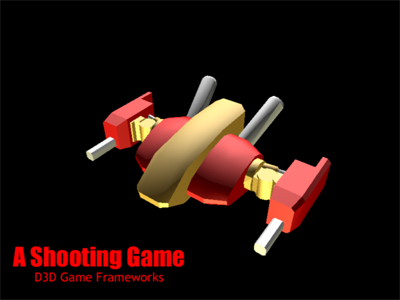
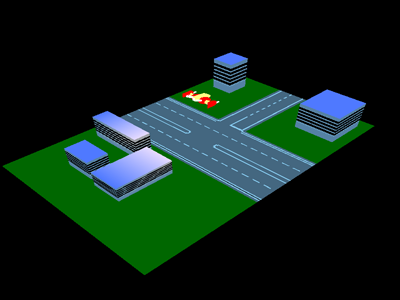
[ 本帖最后由 geekman 于 1-8-2008 03:56 PM 编辑 ] |
|
|
|
|
|
|
|
|
|
|
|
楼主 |
发表于 1-8-2008 03:48 PM
|
显示全部楼层
设定完光源后,就要设定镜头,这也是之前的2D版所没有的:- //d3dev.Transform.Projection = Matrix.OrthoLH(25f, 25f, 1f, 60f);
- d3dev.Transform.Projection = Matrix.PerspectiveFovLH((float)(Math.PI / 4),
- (float)(this.Width / this.Height),
- 1f, 100f);
- d3dev.Transform.View = Matrix.LookAtLH(new Vector3(15f, 20f, -15f),
- new Vector3(0f, 0f, 0f),
- new Vector3(0f, 1f, 0f));
Ok,镜头的设定是通过两个变形(Transform)来完成的:投影(projection)和 视线 (view)。我采用了PerspectiveFovLH 也就是 Perspective Field of View Left Hand (因为我的场景是使用左手式的,还记得吗?),第一个参数是(Math.PI / 4)也就是镜头视线的宽度,设定为90度(以镜头方向为中心,左右各伸延45度), 第二个参数是画面宽度和高度的对比(Aspect Ratio),一般荧幕是4:3,也就是1.3333(640x480,800x600,1024x768依此类推),阔荧幕是16:9(1280x720),或者 16:10(1440x900),第四个参数是近景限制,也就是说距离镜头少过这数值的物体井不会被描绘出来(我设定为一个距离单位),最后的就是远景限制,也就是说和镜头超过这个距离的物体将不会被描绘出来。
第二个镜头设定的是其视线,三个参数分别为 1)镜头所在位置,2)镜头对准的焦点,和 3)镜头向上的方向(决定镜头的那个方向为上 - 你可以旋转镜头的方向的,你知道吗?)
这两项设定都是使用矩阵(Matrix)来进行的,如果你不熟悉矩阵的运作和原理,请询问你的数学老师(正确来书应该是Matematik Tambahan的老师,一般的数学老师可能不会懂这些的。。。
接下来是载入游戏使用的立体模型和初始化资源设定:- groundMesh = new MyMeshClass(d3dev);
- groundMesh.loadFromMeshFromX("ground.x");
- player = new PlayerClass("ship.x", d3dev);
载入X档案我是使用了另外一个档案里的Class MyMeshClass,C# 允许你把各个Class储存在不同的档案 (class file) 里面以方便管理和再循环使用。关于 MyMeshClass 和 PlayerClass 以及其 base class 的 ActorClass,我会在以后慢慢讲解。
[待续]
[ 本帖最后由 geekman 于 1-8-2008 03:52 PM 编辑 ] |
|
|
|
|
|
|
|
|
|
|
|
楼主 |
发表于 1-8-2008 04:21 PM
|
显示全部楼层
- using System;
- using System.Collections.Generic;
- using System.Text;
- using System.Windows.Forms;
- using Microsoft.DirectX;
- using Microsoft.DirectX.Direct3D;
- namespace Project1
- {
- class MyMeshClass
- {
- Device device;
- Mesh mesh;
- Material[] material;
- Texture[] texture;
- ExtendedMaterial[] extmaterial;
- Matrix matrix;
-
- public MyMeshClass(Device dev)
- {
- device = dev;
- mesh = null;
- material = null;
- texture = null;
- extmaterial = null;
- matrix = Matrix.Translation(0f, 0f, 0f);
- }
- public bool loadFromMeshFromX(string filename)
- {
- try
- {
- mesh = Mesh.FromFile(filename, MeshFlags.SystemMemory, device, out extmaterial);
- if (texture == null)
- {
- texture = new Texture[extmaterial.Length];
- material = new Material[extmaterial.Length];
- for (int i = 0; i < extmaterial.Length; i++)
- {
- material[i] = extmaterial[i].Material3D;
- material[i].Ambient = material[i].Diffuse;
- if (extmaterial[i].TextureFilename != null && extmaterial[i].TextureFilename.Length > 0)
- {
- texture[i] = TextureLoader.FromFile(device, extmaterial[i].TextureFilename);
- }
- }
- }
- return true;
- }
- catch (Direct3DXException)
- {
- return false;
- }
- }
- public void setMatrix(Vector3 vector)
- {
- matrix.Translate(vector);
- }
- public void drawMesh()
- {
- device.SetTransform(TransformType.World, matrix);
- for (int i = 0; i < extmaterial.Length; i++)
- {
- device.Material = material[i];
- device.SetTexture(0, texture[i]);
- mesh.DrawSubset(i);
- }
- }
- public void drawMesh(Matrix newMatrix)
- {
- device.SetTransform(TransformType.World, newMatrix);
- for (int i = 0; i < extmaterial.Length; i++)
- {
- device.Material = material[i];
- device.SetTexture(0, texture[i]);
- mesh.DrawSubset(i);
- }
- }
- }
- }
drawMesh()这个函式我提供了两种 overload 版本,一个会接受一个 Matrix 作为Argument,另一个则不接受任何 argument (使用其内部的 matrix ),这是为了配合不同的情况(PlayerClass 需要提供 Matrix 以作变形之用,以后的另一个一 ActorClass 为基础的 EnemyClass 将不需要提供 matrix, 它会使用自己内部的 matrix 做运算)。
[待续] |
|
|
|
|
|
|
|
|
|
|
|
楼主 |
发表于 2-8-2008 10:38 AM
|
显示全部楼层
- using System;
- using System.Collections.Generic;
- using System.Text;
- using System.Windows.Forms;
- using Microsoft.DirectX;
- using Microsoft.DirectX.Direct3D;
- using Microsoft.DirectX.DirectInput;
- using Microsoft.DirectX.DirectSound;
- namespace Project1
- {
- class ActorClass
- {
- Vector3 pos;
- Matrix matrix;
- Microsoft.DirectX.Direct3D.Device device;
- MyMeshClass actorMesh;
-
- public ActorClass(string meshfile, Microsoft.DirectX.Direct3D.Device dev)
- {
- pos = new Vector3(0f, 0f, 0f);
- device = dev;
- actorMesh = new MyMeshClass(dev);
- actorMesh.loadFromMeshFromX(meshfile);
- }
- public void setPos(Vector3 newPos)
- {
- pos = newPos;
- }
- public void setPos(float newX, float newY, float newZ)
- {
- pos.X = newX;
- pos.Y = newY;
- pos.Z = newZ;
- }
-
- public void moveX(float delta)
- {
- pos.X += delta;
- }
- public void moveY(float delta)
- {
- pos.Y += delta;
- }
- public void moveZ(float delta)
- {
- pos.Z += delta;
- }
- public void actorUpdate()
- {
- matrix.Translate(pos);
- }
- public void actorDraw()
- {
- actorMesh.drawMesh(matrix);
- }
- }
- }
[待续] |
|
|
|
|
|
|
|
|
|
|
|
楼主 |
发表于 2-8-2008 10:54 AM
|
显示全部楼层
这就是用 ActorClass 做出来的 PlayerClass, 由于多数的功能已经由 ActorClass 包办了,所以 PlayerCalss 看来空荡荡的,只是增加了读取键盘输入和根据输入来移动玩家控制的战机。- using System;
- using System.Collections.Generic;
- using System.Text;
- using System.Windows.Forms;
- using Microsoft.DirectX;
- using Microsoft.DirectX.Direct3D;
- using Microsoft.DirectX.DirectInput;
- using Microsoft.DirectX.DirectSound;
- namespace Project1
- {
- class PlayerClass : ActorClass
- {
- float velocity;
- public PlayerClass(string meshfile, Microsoft.DirectX.Direct3D.Device dev) : base(meshfile, dev)
- {
- velocity = 0.1f;
- setPos(0f, 5f, 0f);
- }
- public void updatePlayer(KeyboardState ks)
- {
- if (ks[Key.A])
- moveX(-velocity);
- if (ks[Key.D])
- moveX(velocity);
-
- if (ks[Key.W])
- moveZ(velocity);
- if (ks[Key.S])
- moveZ(-velocity);
-
- actorUpdate();
- }
- }
- }
其实悟性高的人只需凭到目前的程度就已经可以开始制作自己的游戏了。
[待续??] |
|
|
|
|
|
|
|
|
|
|
|
楼主 |
发表于 2-8-2008 11:18 AM
|
显示全部楼层
顺便一提我在这个 Project 用过的软件:
1)Blender 一个免费的 3D 模型制作软件,不过使用过 3D Studio Max 的我觉得这个 blender 的制作者应该是来自300万光年外的外星人,不,并不是因为 blender 先进到超越地球科技 300万光年,而是这个软件的使用界面和操作方式实在和许多大家已经熟悉的软件(甚至与3D 软件无关的,泛指操作上的普遍性,也就是 Common Sense 啦)南轩北辙,根本让人无所适从,我只是用它作为 3DS 档案处理器,用于调整模型位置和导出 3DS 档案。
网址:www.blender.org
2)Anim8tor 另一款很受欢迎的免费 3D 模型制作软件,单看界面觉得会比 blender 较接近地球科技,但是可以肯定在建模方面会较死板,不过在制作动画方面的功能蛮不错的(不然哪敢叫Animator?),同样的我只是用它来调整模型的位置和导出 3DS 档案。这个软件有一个我很喜欢的功能,就是可以自动把模型的位置对准世界起源点(World Origin)。
网址:www.anim8or.com
3)3DSConv.exe 不管是 blender 还是 anim8tor,都无法正确的导出 X档案,甚至连DX SDK 附送的 XViewer 也无法开启它们导出的 X档案。我相信这是 DX SDK March 2008 又再改了什么设定而导致它们的 exporter 输出的 X档案格式无效了。因此,为了能够把 3DS 档案转换成 X档案,你必须使用这个软件,它能把 3DS 格式的模型档案转换成 X格式。
网址:由于这是一个很旧的软件(2005年左右),新的DX SDK 也没有再提供这个软件,所以你得自己去 www.google.com 搜寻。记得要找2005年的版本,更早期的版本可能无法输出正确的 X档案格式。
[ 本帖最后由 geekman 于 2-8-2008 11:21 AM 编辑 ] |
|
|
|
|
|
|
|
|
|
|
|
楼主 |
发表于 5-8-2008 11:32 AM
|
显示全部楼层
|
|
|
|
|
|
|
|
|
|
|
 发表于 6-8-2008 09:45 AM
|
显示全部楼层
发表于 6-8-2008 09:45 AM
|
显示全部楼层
回复 8# geekman 的帖子
正確的選則
現在有support shading的gpu到處都是
是時候用它的了
雖然我本身並不是很喜歡xna
(因為是xbox360的control啊)
 |
|
|
|
|
|
|
|
|
|
|
|
发表于 6-8-2008 10:01 AM
|
显示全部楼层
|
|
|
|
|
|
|
|
|
|
|
楼主 |
发表于 6-8-2008 10:43 AM
|
显示全部楼层
|
|
|
|
|
|
|
|
|
|
|
发表于 6-8-2008 10:52 AM
|
显示全部楼层
给楼主按个好 |
|
|
|
|
|
|
|
|
|
|
|
楼主 |
发表于 6-8-2008 10:54 AM
|
显示全部楼层
回复 12# cristiano~7 的帖子
谢谢您的支持 
如果有谁要这个program的Source code + exe + model + graphics,可以PM 我你的e-mail,不过压缩了的档案大小是220KB,so你得先确定你的信箱能够接受至少220KB的attachment哦。
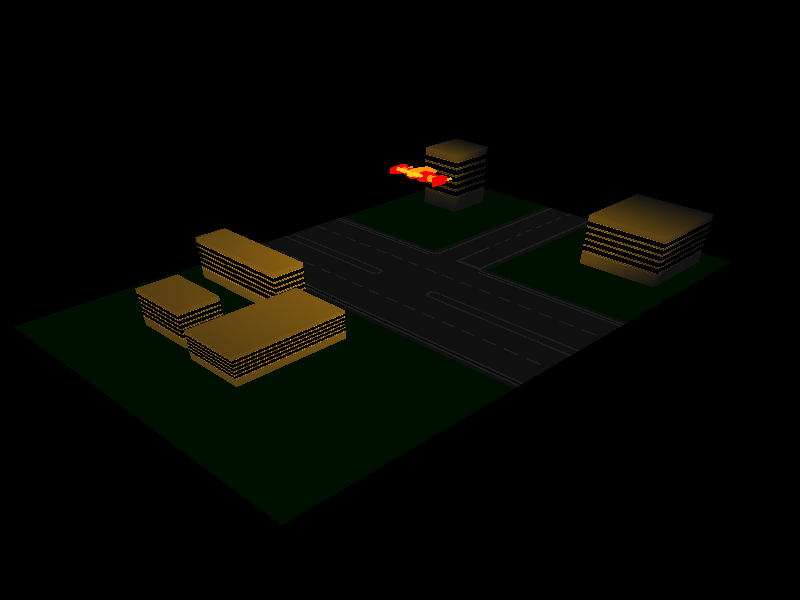
新的画面,关闭了太阳光,调低了环境光度,就变成这样的诡异画面。。。很想用它来制作一个灵异恐怖游戏呢。。。
[ 本帖最后由 geekman 于 6-8-2008 11:09 AM 编辑 ] |
|
|
|
|
|
|
|
|
|
|
|
发表于 6-8-2008 12:17 PM
|
显示全部楼层
|
|
|
|
|
|
|
|
|
|
|
发表于 6-8-2008 12:20 PM
|
显示全部楼层
|
squall 做了 什么 游戏, 怎么 没有放上来。。。 |
|
|
|
|
|
|
|
|
|
|
|
楼主 |
发表于 6-8-2008 01:05 PM
|
显示全部楼层
回复 14# Squall_Chua 的帖子
Ogre 是个渲染引擎,底子里还是使用 DX 或者 OGL 的,目前我是打算使用能够给我最大自由度的 API,作为学习用途,等掌握了足够的知识再来决定要采用哪一个 Middle ware。
XNA 也是有支援 K+M 的,只是你得自己控制它的一切设定和读取/处理,基本和 MDX 差不多。SlimDX 是一群 MDX 支持者在微软放弃了 MDX 之后自行开发的替代品,以 MDX 为基础,修改了一些 bug,wrap 了一些麻烦的界面等等,的确是一个不错的 MDX 替代品。
其实 MDX 已经很容易上手了,C++ + DX 才真的要人命!我之前就是用 C++ 做这个 Project 的,但是要记忆和弄明白那些 COM 界面就有够头痛的,MDX 就会帮你提议可能使用的 Method 和 variables,十分方便,这就是为什么我一上手 MDX 就爱不释手。
顺带一提,由于我一开始作这个 C# project 是以我已经做过的 C++ 版本移植过去的,所以一开始两个版本几乎大同小异,但是执行起来却发现 C++ 版本竟然比 C# 版本快了超过4倍!这当场让我想放弃 C#,可是一看到 C++ 里面那些 COM 界面,我又决定不放弃 C# + MDX 了。。。 |
|
|
|
|
|
|
|
|
|
|
|
发表于 6-8-2008 02:06 PM
|
显示全部楼层
回复 16# geekman 的帖子
ogre的api基本上已經很stable了
而且也能夠做出AAA class的遊戲
也滿好用下的
有不少的公司都使用它來做real-time rendering
要說performance的話
其實就是看underlying的rendering system的performance而已
所以我的打算是用一堆的free tools來做出個engine來用
醬子會比較好
選擇性多
到時候我就是要醬開始做我的project了
祝我好運吧 |
|
|
|
|
|
|
|
|
|
|
|
楼主 |
发表于 7-8-2008 12:22 PM
|
显示全部楼层
|
|
|
|
|
|
|
|
|
|
|
发表于 7-8-2008 01:53 PM
|
显示全部楼层
回复 18# geekman 的帖子
那本書我有看到過
不過沒仔細翻過它的內容
我最近的興趣不只在graphics上面
還有玩physics的東西
現在其實還滿流行physics的說
對了
方便給我你的聯絡方式嗎
有機會可以討論下這些東西
 |
|
|
|
|
|
|
|
|
|
|
|
楼主 |
发表于 7-8-2008 02:04 PM
|
显示全部楼层
回复 19# Squall_Chua 的帖子
呃,发短消息给你的时候好像出了问题,不知道有没有送出去,还是直接放在这里了:
MSN/E-Mail: (公开期已过)
[ 本帖最后由 geekman 于 8-8-2008 11:01 AM 编辑 ] |
|
|
|
|
|
|
|
|
|
| |
 本周最热论坛帖子 本周最热论坛帖子
|










 变色卡
变色卡 千斤顶
千斤顶


 1611
1611  84
84

